Skip to content

Scenario · Manufacturing · Month-end MISScenario · Month-end MIS

Month-end MIS without the Excel marathon

Every month Anika, in Accounts, spent two days asking around and rebuilding the status in Excel for the owner’s review. By the time it was printed, half of it had changed.

TaskMIS Dashboard, Analytics, October 2026: on-time completion 94%, 15 of 16 completed on or before the date; overdue share 32%, 7 of 22 open tasks past their date; median closure time 4.0 days over 16 tasks; 6 deadline revisions, total slip 27 days, top reason Workload; completion by department and by employee; pending review ageing; why dates moved: Workload 2, Dependency on others 2, Client delay 1, Scope change 1
Dashboard → Analytics, Saturday 31 Oct, 10:00 AM · Beta1 demo workspace, sample data
See the same month end in TaskMIS

Illustrative scenario. Beta1 is a fictional company. Not a customer story.

Meet Beta1 — a fictional valve manufacturer in Coimbatore.

  • Anika BoseAnika · Accounts
  • Aarav ShahAarav · Sales · Admin

What went wrong

Two days of copying, for numbers already old.

  1. Accounts · 29 OctMessages every department for its status.
  2. Accounts · 30 OctRebuilds the month in a spreadsheet.
  3. Review · 2 NovHalf the hour goes on whose numbers are right.
  4. AccountsGST work waits until the MIS is done.

One spreadsheet. Three problems.

  • Two days lost every monthThe person compiling the MIS stops their own work to do it.
  • Numbers nobody trustsEach figure is someone’s reply, copied by hand.
  • No way back to the detailA total in the sheet doesn’t open the tasks behind it.

The same month end with TaskMIS

Same review. The month is ready on the last day.

  1. 01 Monthly MISSat 10:00 AM
  2. 02 DepartmentsSat 10:05 AM
  3. 03 AnalyticsSat 10:10 AM
  4. 04 AgendaSat 10:15 AM

Sat 31 Oct, 10:00 AM · Monthly MISSat 31 Oct, 10:00 AM · The month, by person

The month by person, without asking anyone.

Aarav opens Reports → Monthly MIS for October: tasks added, completed and pending for each person, and how many high-priority and high-impact tasks they closed. Export Excel gives the same table as a file, TaskMIS_monthly_2026-10-31.xlsx.

Monthly MIS · October 2026 · 5 people
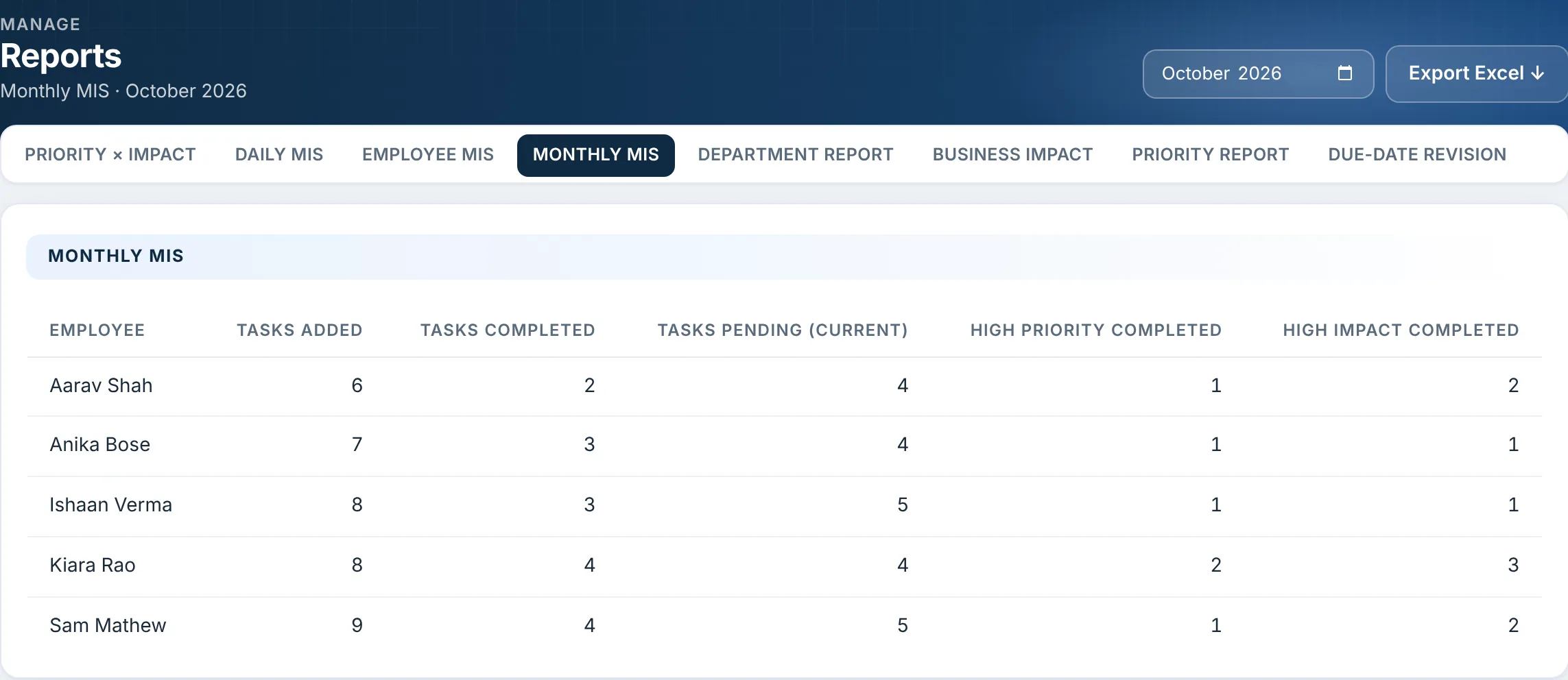
Reports, Monthly MIS, October 2026, with Export Excel. Aarav Shah: 6 added, 2 completed, 4 pending, 1 high priority completed, 2 high impact completed; Anika Bose: 7, 3, 4, 1, 1; Ishaan Verma: 8, 3, 5, 1, 1; Kiara Rao: 8, 4, 4, 2, 3; Sam Mathew: 9, 4, 5, 1, 2
Reports → Monthly MIS, October 2026

Sat 31 Oct, 10:05 AM · DepartmentsSat 31 Oct, 10:05 AM · The same work, by department

The same work, by department.

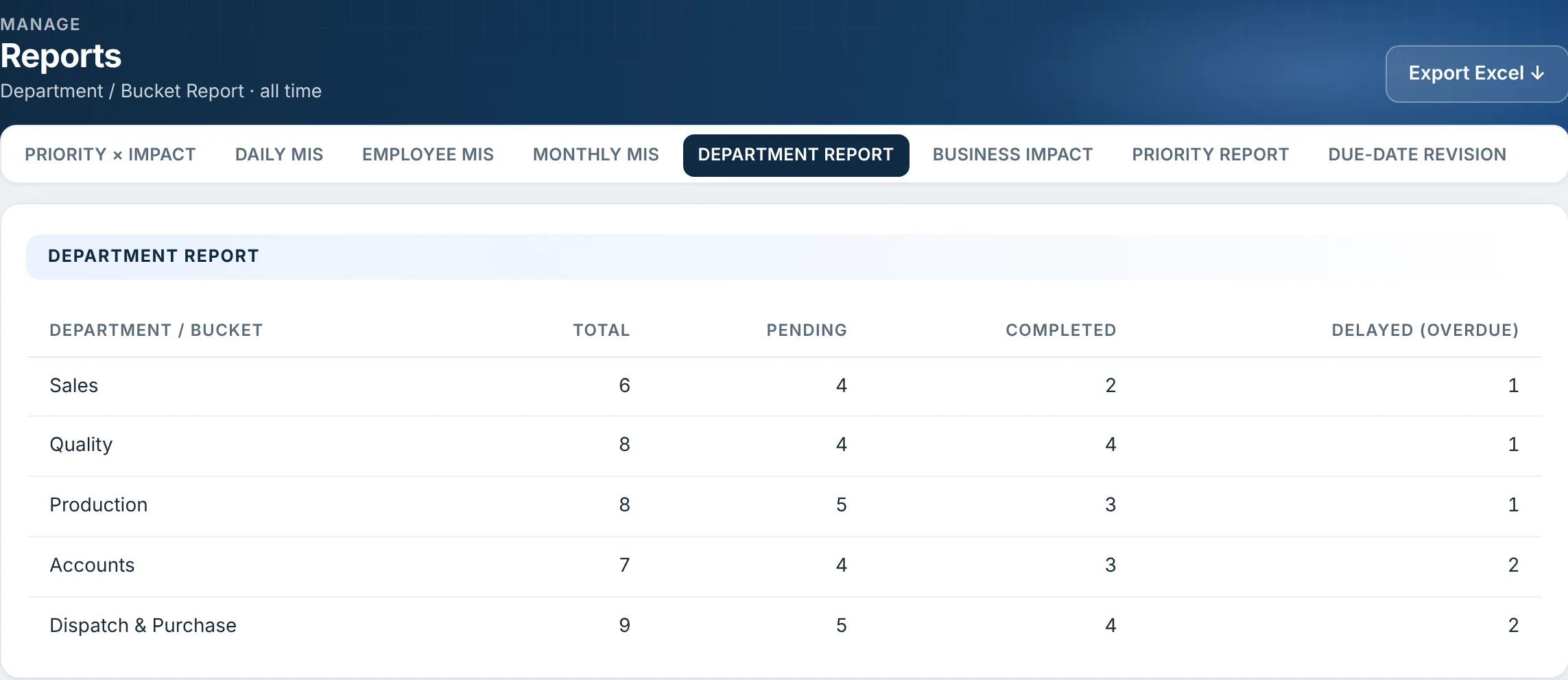
The Department Report shows every department’s total, pending, completed and overdue tasks. Dispatch & Purchase carries the most, with 9; Accounts and Dispatch & Purchase have the most overdue, 2 each.

Department Report · all time

Reports, Department / Bucket Report, all time: Sales 6 total, 4 pending, 2 completed, 1 overdue; Quality 8, 4, 4, 1; Production 8, 5, 3, 1; Accounts 7, 4, 3, 2; Dispatch & Purchase 9, 5, 4, 2
Reports → Department Report

Sat 31 Oct, 10:10 AM · AnalyticsSat 31 Oct, 10:10 AM · How the month went

How the month went, on one page.

Dashboard → Analytics for October: 15 of 16 tasks completed on or before their date, a median of 4 days from raising to closing, and 6 date moves, with the reasons listed. Every number there is also a row in Reports.

Analytics, October 2026: completion by department, on time, late and still open; completion by employee, on-time share: Kiara Rao, Ishaan Verma, Anika Bose and Aarav Shah 100%, Sam Mathew 75%; pending review ageing: 1 waiting 8+ days; why dates moved: Workload 2, Dependency on others 2, Client delay 1, Scope change 1
Dashboard → Analytics, October

Sat 31 Oct, 10:15 AM · AgendaSat 31 Oct, 10:15 AM · Monday’s agenda, already written

Monday’s review starts with decisions.

At the foot of Analytics, the management action list: 3 tasks overdue beyond 7 days to escalate, 1 revised more than twice to review, 6 with no update in 7 days to nudge, and 1 person over their load. Each line opens its tasks. Anika’s Saturday goes back to the October GST work.

Management action list: overdue beyond 7 days, 1002-0001 and 1011-0002, 3, Escalate; deadline revised more than twice, 1020-0014, 1, Review; no update for 7+ days, 6, Nudge; people over their load, Sam Mathew 5 of 4, 1, Rebalance
Analytics → Management action list · each line opens its tasks

Try it before your next month end.

Free for up to 6 members. No credit card required.

Join TaskMIS Today

The difference

Same month. Different month end.

DateIn a spreadsheetIn TaskMIS
29 OctThuSpreadsheetAnika messages every department for status.In TaskMISThe status is on the tasks; nobody is asked
30 OctFriSpreadsheetThe spreadsheet takes the whole day.In TaskMISAnika works on the October GST reconciliation
31 OctSatSpreadsheetFigures copied by hand, already changing.In TaskMISMonthly MIS, Department Report and Analytics, read at 10 AM
2 NovMonSpreadsheetThe review argues over the numbers.In TaskMISThe review starts from the action listReady

The review happened on Monday either way. The difference is that nobody spent two days building the numbers for it.

What could change

Three outcomes for Beta1

The MIS builds itself.

Reports count the month from the tasks themselves, by person and by department, and export to Excel in one click.

FeatureMIS reports · Export to Excel

One page says how the month went.

On-time completion, closure time, date moves and their reasons, side by side.

FeatureAnalytics

The review moves from numbers to decisions.

The action list names what to escalate, review, nudge or rebalance, and each line opens its tasks.

FeatureEvery number opens its tasks

Possible outcomes in a fictional scenario, not measured customer results.

Used in this scenario

  • MIS reports
  • Analytics
  • Export to Excel
  • Management action list
  • Dashboard
See every feature on the Product page →

For management

Four answers at month end

  • What did each person add, close and leave open this month?

    Answered in: Reports · Monthly MIS
  • Which department is carrying the most, and the most overdue?

    Answered in: Reports · Department Report
  • Did we finish on time, and how long did work take?

    Answered in: Dashboard · Analytics
  • What needs a decision at the review?

    Answered in: Analytics · Management action list

Start this week

Start with this month’s review

  1. Make sure every follow-up lives as a task in TaskMIS this month, with an owner and a date.
  2. On the last working day, open Reports → Monthly MIS and Dashboard → Analytics.
  3. Take the management action list into the review, and export to Excel only if someone needs the file.

Questions

Quick answers

Who can see the reports?

Admins and heads of department. A head of department sees their own reporting line; an admin sees the whole team. Members see their own work on My Day.

Can we pick an earlier month?

Yes. The Monthly MIS, the Due-Date Revision report and Analytics each have a month picker.

Does TaskMIS replace our accounts MIS?

No. It reports on the work: tasks, dates, owners and delays. Sales, money and stock stay in your accounting software.

Bring clarity and accountability to your team.

Join TaskMIS Today

Free for up to 6 members. No credit card required.