Skip to content

Scenario · Manufacturing · Getting startedScenario · Getting started

Moving follow-ups out of the WhatsApp group: the first 30 days

Every promise at Beta1 was a message in one of three groups. Aarav could scroll back to find who said what, but not who owned it, or by when. On a Monday in September he started moving the work out.

TaskMIS Management overview, Tuesday 13 Oct 2026, day 30, the whole team of 5 people: 22 open tasks across 5 departments; 7 overdue; 3 due today; 3 at risk; 10 due this week; 16 completed in the last 30 days, 94% on or before the date; 10 high priority open; 4 on hold or waiting
Dashboard on day 30, Tuesday 13 Oct · Beta1 demo workspace, sample data
See the first month in TaskMIS

Illustrative scenario. Beta1 is a fictional company. Not a customer story.

Meet Beta1 — a fictional valve manufacturer in Coimbatore.

  • Aarav ShahAarav · Sales · Admin
  • Ishaan VermaIshaan · Production
  • Kiara RaoKiara · Quality
  • Sam MathewSam · Purchase
  • Anika BoseAnika · Accounts

What went wrong

Every promise was a message. None had an owner.

  1. Group chat“Can someone renew the fire certificate?”
  2. Group chat“Will do,” from two people.
  3. NotebookSomeone writes it down. Someone else doesn’t.
  4. Excel · month endThe sheet says “in progress”. Nobody knows since when.

Three groups. Three problems.

  • No single ownerA thumbs-up from two people means neither is sure it’s theirs.
  • No date that holds“By Friday” is a message, not a deadline. When it slips, nobody hears why.
  • No recordFinding what was agreed means scrolling back through weeks of chat.

The first month with TaskMIS

Same team. The follow-ups move, one at a time.

  1. 01 Set upDay 1, 9 AM
  2. 02 InviteDay 1, 9:40 AM
  3. 03 Move inDays 1 – 2
  4. 04 Day 30Tue 13 Oct

Mon 14 Sep, 9:10 AM · Set upMon 14 Sep, 9:10 – 9:30 AM · A free workspace, and the departments

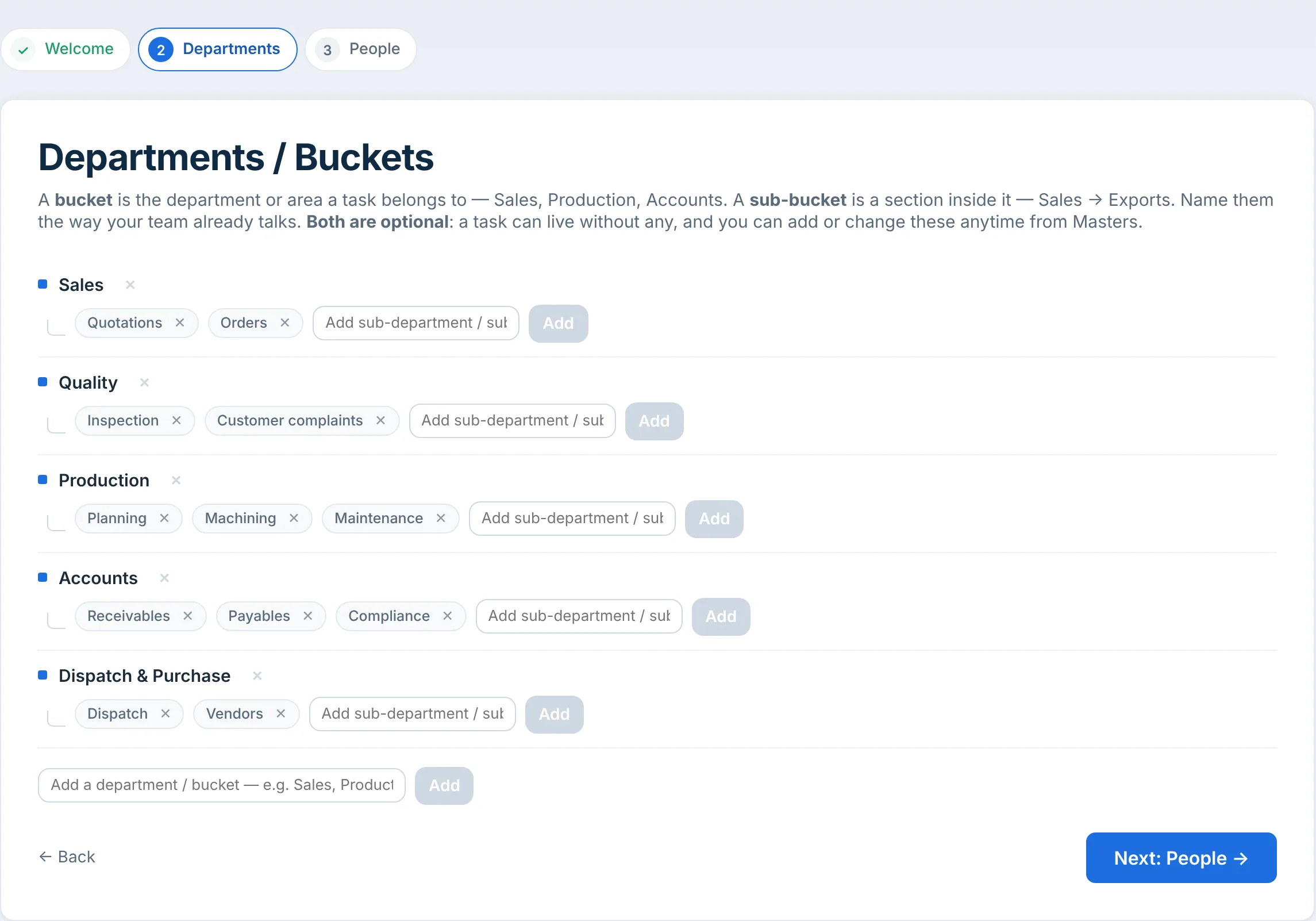
A free workspace that starts empty.

Aarav signs up and creates the workspace, Plant Operations. It starts with no departments and no tasks. In the setup he names the five departments the work already falls into, each with its sections: Sales, Quality, Production, Accounts, and Dispatch & Purchase.

My Day in a new workspace, Monday 14 September: Your workspace is ready, Aarav. It is completely empty, which is the right place to start. Three steps: name your departments, invite your team, create the first task. Start the 3-step setup
My Day on Day 1, 9:15 AM · the workspace starts empty
Setup, Departments / Buckets: Sales with Quotations and Orders; Quality with Inspection and Customer complaints; Production with Planning, Machining and Maintenance; Accounts with Receivables, Payables and Compliance; Dispatch & Purchase with Dispatch and Vendors
Setup → Departments, 9:30 AM · named the way the team already talks

Mon 14 Sep, 9:40 AM · InviteMon 14 Sep, 9:40 AM · Invite the four colleagues

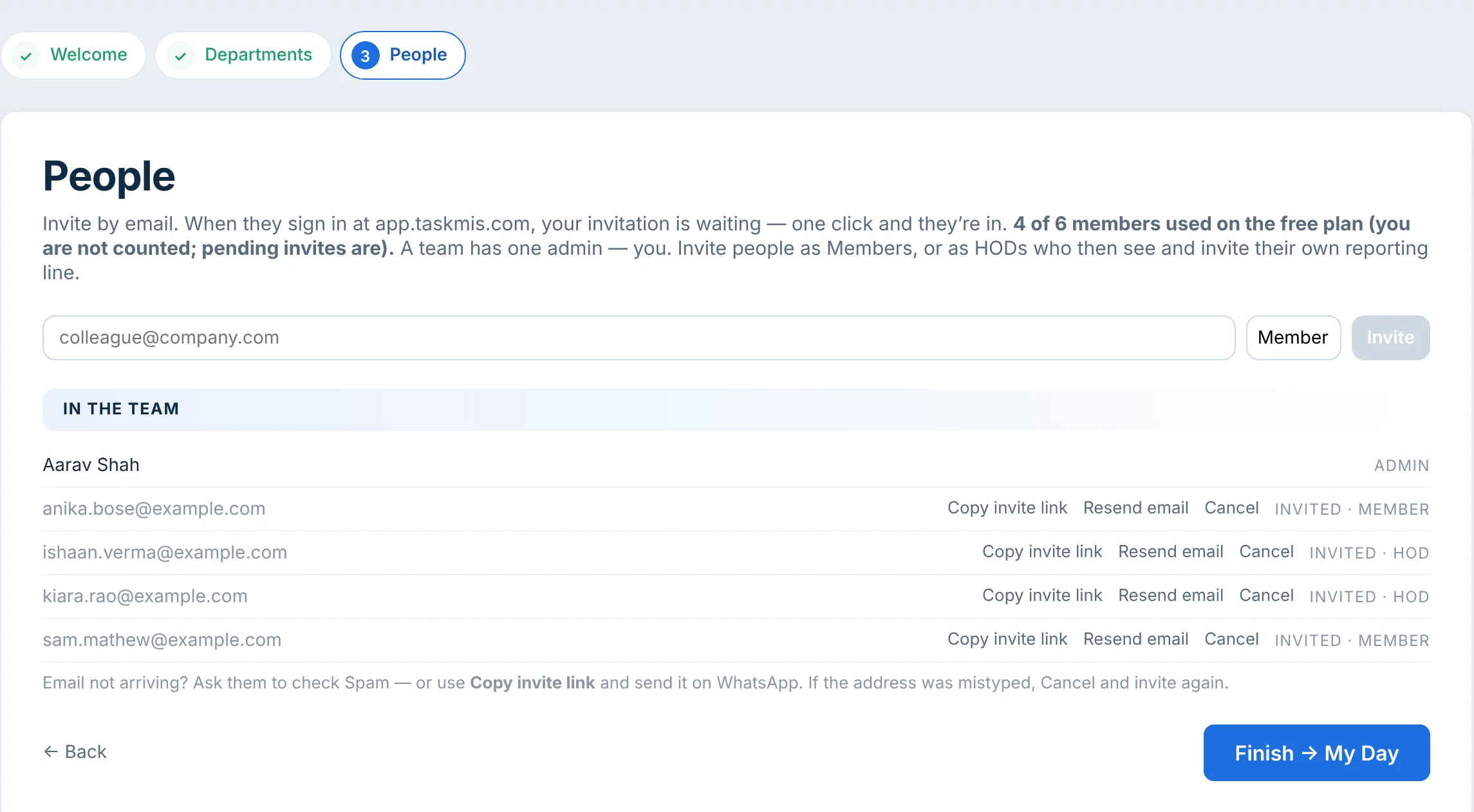
Four invitations, with roles.

Aarav invites Ishaan and Kiara as heads of department, and Sam and Anika as members. An invitation is the only way in, and the free plan covers six. My Day keeps a Getting started list: three of four steps done, the first task next.

Invited: Ishaan and Kiara as HOD · Sam and Anika as Member

Setup, People: invite by email; 4 of 6 members used on the free plan, you are not counted, pending invites are; a team has one admin; invite people as Members, or as HODs who then see and invite their own reporting line. In the team: Aarav Shah, admin; anika.bose@example.com invited as member; ishaan.verma@example.com invited as HOD; kiara.rao@example.com invited as HOD; sam.mathew@example.com invited as member
Setup → People, 9:40 AM

Mon 14 Sep · 9:50 AM

Getting started on My Day: workspace created, departments added, one more person invited. Next: create the first task.

Getting started, 3 of 4 done, next: create the first task. Workspace created, Plant Operations, done; Departments added, done; Create the first task, one owner and one due date, if the date ever moves TaskMIS asks why, to do; Invite one more person, done
My Day → Getting started

Mon 14 – Tue 15 Sep · Move inMon 14 Sep, 11 AM – Tue 15 Sep · Move the open promises in

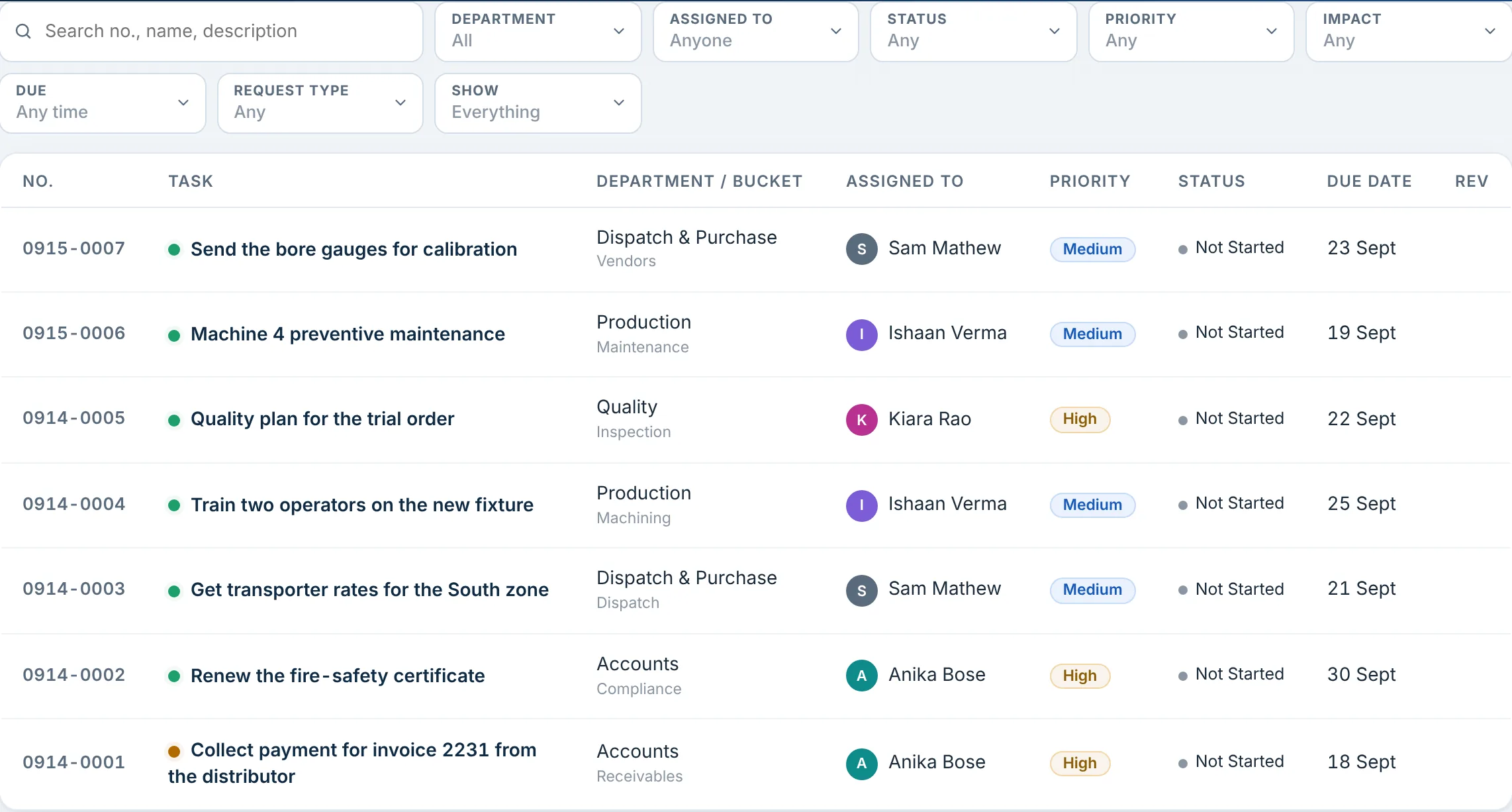
Each open promise becomes a task, with one owner and one date.

Aarav scrolls back through the groups and moves five open promises in as tasks, from the distributor’s payment to the fire-safety certificate. By evening all four have joined. On Tuesday morning Ishaan and Kiara raise their own. Each owner now finds their tasks on My Day, and the group goes back to being a conversation.

7 tasks · 4 owners · 4 departments

Tasks, Tuesday 15 Sep, 7 tasks: 0915-0007 Send the bore gauges for calibration, Sam Mathew, due 23 Sept; 0915-0006 Machine 4 preventive maintenance, Ishaan Verma, due 19 Sept; 0914-0005 Quality plan for the trial order, Kiara Rao, High, due 22 Sept; 0914-0004 Train two operators on the new fixture, Ishaan Verma, due 25 Sept; 0914-0003 Get transporter rates for the South zone, Sam Mathew, due 21 Sept; 0914-0002 Renew the fire-safety certificate, Anika Bose, High, due 30 Sept; 0914-0001 Collect payment for invoice 2231 from the distributor, Anika Bose, High, due 18 Sept
Tasks on Day 2, 10 AM · every follow-up with an owner and a date

Tue 13 Oct, 9:30 AM · Day 30Tue 13 Oct, 9:30 AM · Day 30: the morning check

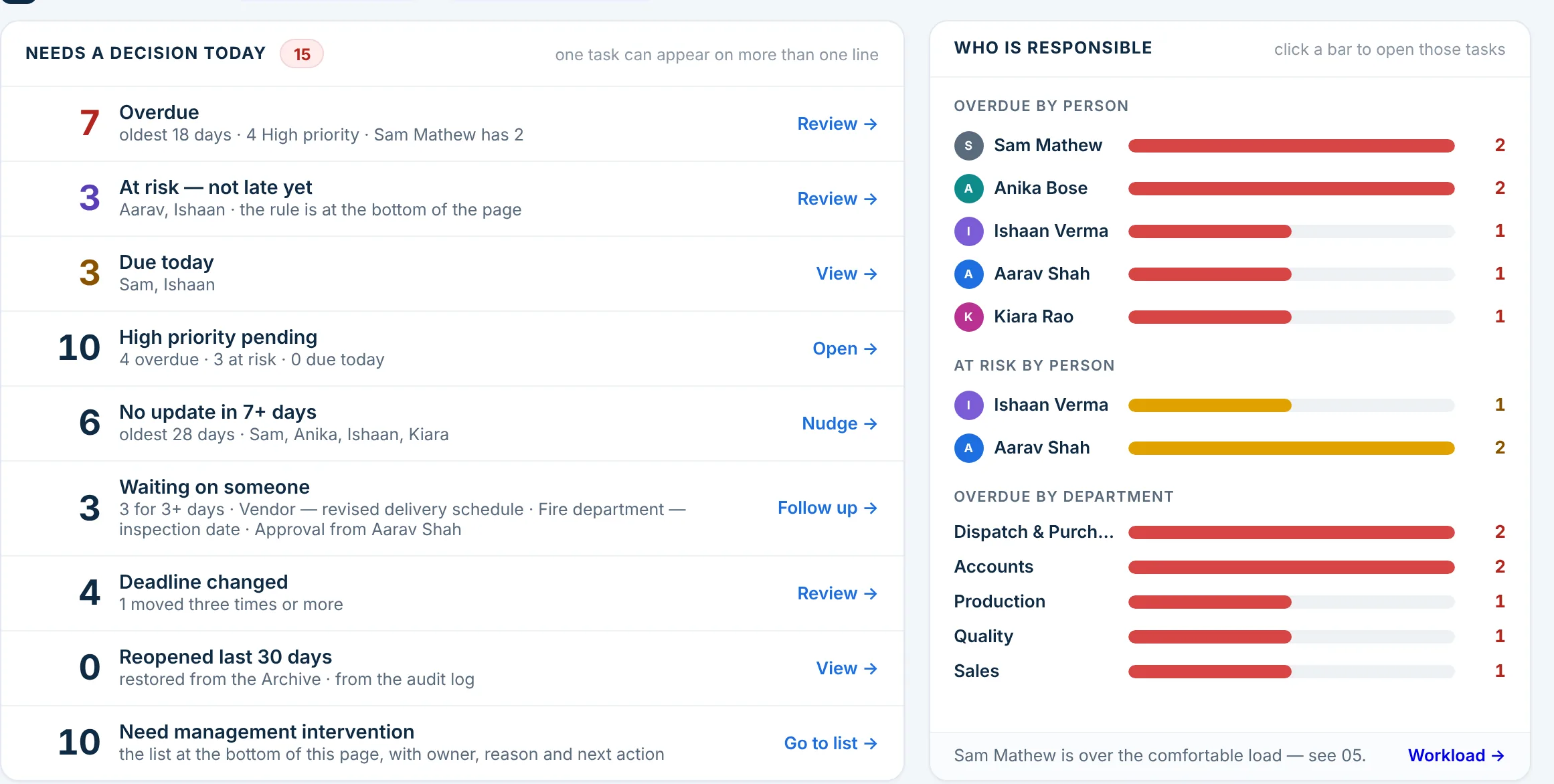
A month in, the follow-ups answer for themselves.

Thirty days on, the dashboard shows 22 open tasks and 16 completed in the last 30 days, 15 of them on or before the date. Needs a decision today lists what is late, at risk or waiting, with names. Nobody had to scroll a chat to find it.

Dashboard, Action required, day 30: Needs a decision today, 15: 7 overdue, oldest 18 days, Sam Mathew has 2; 3 at risk, not late yet; 3 due today; 10 high priority pending; 6 with no update in 7+ days; 3 waiting on someone; 4 deadlines changed; 0 reopened in the last 30 days; 10 need management intervention. Who is responsible: overdue and at risk by person and by department
Dashboard → Action required, day 30

Start your first 30 days today.

Free for up to 6 members. No credit card required.

Join TaskMIS Today

The difference

Same team. Different month.

DateIn the group chatsIn TaskMIS
Day 1MonGroup chatsThree groups, a few notebooks, one sheet.In TaskMISOne workspace, five departments, four invitations
Day 1MonGroup chats“Will do.” Twice.In TaskMISFive open promises moved in, each with an owner and a date
Day 2TueGroup chatsScroll back to find who said what.In TaskMISEach person’s tasks on their own My Day
Day 30TueGroup chatsMonth end: rebuild the status by hand.In TaskMISThe dashboard shows what is late, at risk or waitingLive

The group chat is still there. The difference is that a follow-up no longer depends on someone scrolling back to find it.

What could change

Three outcomes for Beta1

Set up in a morning, free.

A workspace, the departments the team already uses, and invitations with roles, in one morning.

FeatureFree sign-up · Departments · Team roles

Every promise has one owner and one date.

Each follow-up becomes a task with one owner and a target date. If the date moves, TaskMIS asks why.

FeatureOne owner on every task · A target date is required

The status no longer needs asking for.

My Day shows each person their own work; the dashboard shows management what needs a decision.

FeatureMy Day · Management dashboard

Possible outcomes in a fictional scenario, not measured customer results.

Used in this scenario

  • Free sign-up
  • Departments and sub-departments
  • Team roles
  • Getting started
  • My Day
  • Management dashboard
See every feature on the Product page →

For management

Four answers that used to be a scroll

  • Who owns this, and by when?

    Answered in: Tasks · List
  • What is late, at risk or waiting today?

    Answered in: Dashboard · Needs a decision today
  • What is on my plate this morning?

    Answered in: My Day
  • Who is on the team, and in what role?

    Answered in: Members

Start this week

Start with one morning

  1. Sign up free, and name your departments the way your team already talks about them.
  2. Invite your heads of department and team members, up to six on the free plan.
  3. Scroll back through your groups once, and move every open promise in as a task with an owner and a date.

Questions

Quick answers

Does TaskMIS read our WhatsApp group?

No. Each follow-up is moved in by a person, as a task with an owner and a date. The group stays for conversation.

Do we need to set up everything on day one?

No. Departments and invitations are optional, and you can add or change them later from Masters and Members.

What does it cost to start?

Nothing. The free plan covers up to 6 members, with no credit card required.

Bring clarity and accountability to your team.

Join TaskMIS Today

Free for up to 6 members. No credit card required.