Skip to content

Scenario · Management · GrowingScenario · Growing

From one unit to two: when informal follow-up stops working

In one shed, Beta1 followed up by walking across the floor. On Monday 2 November it opened Unit 2, a machining shed 8 km away. The same habits now meant phone calls, and things that used to be seen were not.

TaskMIS Dashboard filtered to the department Unit 2, Monday 9 Nov at 9:30 AM: showing Unit 2, 3 open tasks. Open tasks 3, 3 people, 1 department; overdue 1, High priority, oldest 3 days; due today 1, Ishaan; at risk 2; due this week 2; completed in the last 30 days 3, 100% on or before the date; High priority open 2; on hold or waiting 1, waiting for Transporter — van rate for the daily shuttle
Dashboard → Department: Unit 2, Monday 9 Nov, 9:30 AM · Beta1 demo workspace, sample data
See the first weeks in TaskMIS

Illustrative scenario. Beta1 is a fictional company. Not a customer story.

Meet Beta1 — a fictional valve manufacturer in Coimbatore.

  • Aarav ShahAarav · Sales · Admin
  • Ishaan VermaIshaan · Production
  • Sam MathewSam · Stores · Dispatch
  • Kiara RaoKiara · Quality
  • Anika BoseAnika · Accounts

What went wrong

Follow-up worked by sight. Unit 2 was out of sight.

  1. Main plantEveryone sees what is pending by walking the floor.
  2. Unit 2 · Mon 2 NovOpens 8 km away with its own list of jobs.
  3. Unit 2The gauge set is still at the main plant.
  4. ManagementCannot say how Unit 2 is doing, except by phone.

One more site. Three costs.

  • Calls replace a glanceWhat one look across the shed used to answer now takes a call.
  • The new site waits on the old oneGauges, drawings and parts sit at the main plant until someone remembers them.
  • No view of the second unitIts open and late work is mixed into the main plant’s, or not written down at all.

The first weeks with TaskMIS

Two sites. The same rules, and one view of each.

  1. 01 Set upFri 30 Oct
  2. 02 RaiseFri 30 Oct
  3. 03 SeeMon 9 Nov
  4. 04 CompareMon 9 Nov

Fri 30 Oct, 3:00 PM · Set upFri 30 Oct, 3:00 PM · Unit 2 becomes a department

The new unit gets its own department.

Aarav adds Unit 2 in Masters, with two sub-departments, Machining and Stores. The people stay the same: Ishaan runs production at both sites and Sam handles stores and the shuttle. Every task now says which site it belongs to.
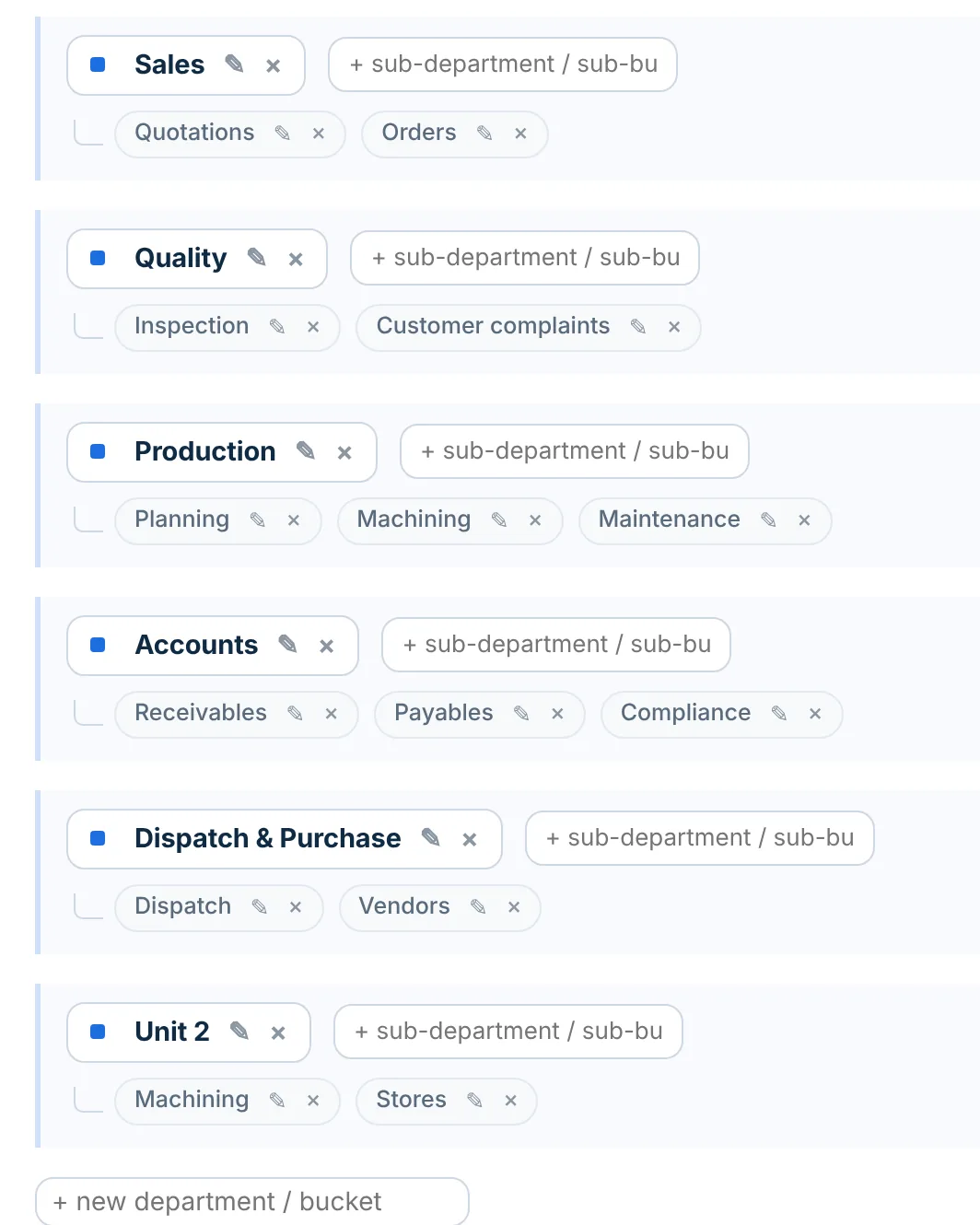
Masters, departments and sub-departments, Friday 30 Oct: Sales with Quotations and Orders; Quality with Inspection and Customer complaints; Production with Planning, Machining and Maintenance; Accounts with Receivables, Payables and Compliance; Dispatch & Purchase with Dispatch and Vendors; Unit 2 with Machining and Stores
Masters → Departments, Friday

Fri 30 Oct · RaiseFri 30 Oct, 3:00 – 3:20 PM · Unit 2’s first week, as tasks

The first week’s work has owners before the unit opens.

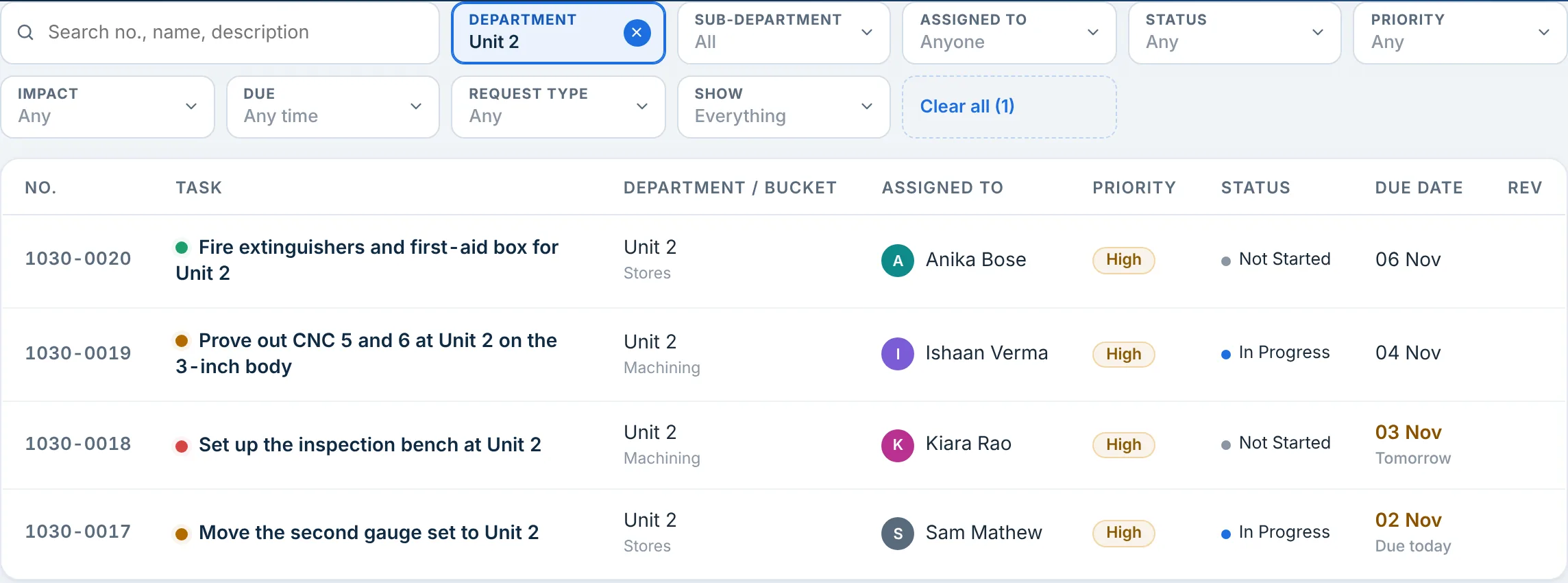
Four tasks for Unit 2, each with one owner and a date: Sam moves the second gauge set, Kiara sets up the inspection bench, Ishaan proves out the two CNC machines, and Anika gets the fire extinguishers and first-aid box in. On Monday morning the list is ready.

Unit 2: 4 tasks · 4 owners · due 2 – 6 Nov

Tasks filtered to the department Unit 2, Monday 2 Nov at 9 AM: 4 tasks. 1030-0020 Fire extinguishers and first-aid box for Unit 2, Stores, Anika Bose, High, Not Started, due 06 Nov; 1030-0019 Prove out CNC 5 and 6 at Unit 2 on the 3-inch body, Machining, Ishaan Verma, In Progress, due 04 Nov; 1030-0018 Set up the inspection bench at Unit 2, Machining, Kiara Rao, Not Started, due 03 Nov, tomorrow; 1030-0017 Move the second gauge set to Unit 2, Stores, Sam Mathew, In Progress, due 02 Nov, today
Tasks → Department: Unit 2, Monday 9 AM

Mon 9 Nov, 9:30 AM · SeeMon 9 Nov, 9:30 AM · One filter, one site

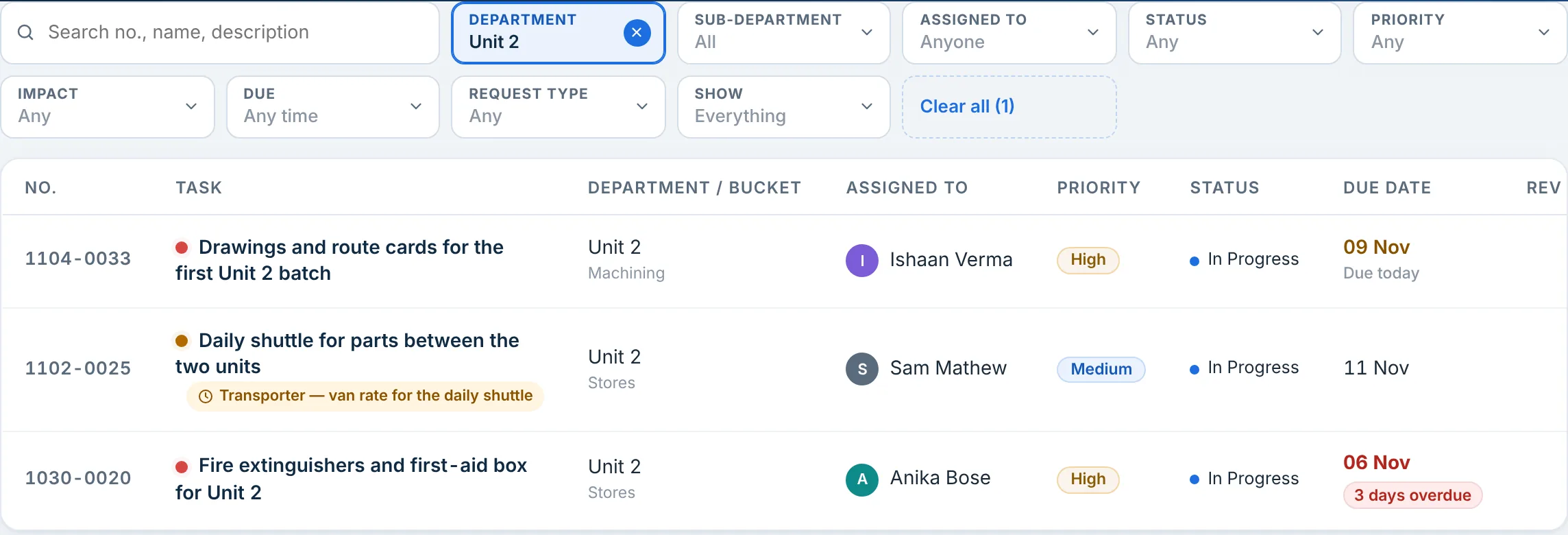
Unit 2’s open work, without a phone call.

A week on, three of the first four are done: the gauge set, the bench, and the CNC prove-out after a two-day move for the power line, recorded with its reason. Three tasks are open: the route cards due today, the shuttle waiting on a transporter’s rate, and the extinguishers, three days late.

Unit 2: 3 open · 1 overdue · 1 waiting

Tasks filtered to the department Unit 2, Monday 9 Nov at 9:30 AM: 3 tasks. 1104-0033 Drawings and route cards for the first Unit 2 batch, Machining, Ishaan Verma, High, In Progress, due 09 Nov, today; 1102-0025 Daily shuttle for parts between the two units, waiting for Transporter — van rate for the daily shuttle, Stores, Sam Mathew, Medium, In Progress, due 11 Nov; 1030-0020 Fire extinguishers and first-aid box for Unit 2, Stores, Anika Bose, High, In Progress, 3 days overdue
Tasks → Department: Unit 2, Monday 9 Nov

Mon 9 Nov · CompareMon 9 Nov · Both units on one page

Unit 2 is a row in the same report.

The Department Report shows Unit 2 beside the main plant’s departments: 6 tasks in all, 3 done, 3 pending, 1 overdue. On the dashboard, one filter shows Unit 2 alone, and every number opens its tasks.

Department Report, all time, Monday 9 Nov: Sales 6 total, 4 pending, 2 completed, 1 overdue; Quality 8, 4, 4, 1; Production 8, 5, 3, 1; Accounts 7, 4, 3, 2; Dispatch & Purchase 9, 5, 4, 2; Unit 2 6 total, 3 pending, 3 completed, 1 overdue
Reports → Department Report, Monday

Try it before your next site opens.

Free for up to 6 members. No credit card required.

Join TaskMIS Today

The difference

Same new unit. Different first week.

DateBy walking acrossIn TaskMIS
30 OctFriBy sightUnit 2’s jobs are in Ishaan’s head.In TaskMISDepartment Unit 2; four tasks with owners and dates
2 NovMonBy sightThe gauge set is still at the main plant.In TaskMISSam’s task, due that day: moved by 10:30
4 NovWedBy sightCNC 6 has no power. Nobody outside Unit 2 knows.In TaskMISDate moved to Friday with the reason
9 NovMonBy sightHow is Unit 2 doing? Call and ask.In TaskMISDashboard, Unit 2: 3 open, 1 overdue, 2 at risk
9 NovMonBy sightThe two sites are compared by feel.In TaskMISDepartment Report: Unit 2 beside the restOne view per site

Unit 2 was 8 km away either way. The difference is that its work could be seen from either site.

What could change

Three outcomes for Beta1

Each site’s work is labelled by site.

A department per unit, with its own sub-departments, so every task says where it belongs.

FeatureDepartments and sub-departments · Masters you control

Management sees one site at a time, or both.

One filter on the dashboard shows a unit alone; the Department Report puts the units side by side.

FeatureManagement dashboard · MIS reports

The rules travel with the work.

One owner, one date and a reason for every move hold at the new site from day one.

FeatureOne owner on every task · A reason for every date change

Possible outcomes in a fictional scenario, not measured customer results.

Used in this scenario

  • Departments and sub-departments
  • Masters you control
  • One owner on every task
  • A reason for every date change
  • Management dashboard
  • Every number opens its tasks
  • MIS reports
  • Waiting for
See every feature on the Product page →

For a business with two sites

Four answers, from either site

  • What is open at the new unit, and who has it?

    Answered in: Tasks · Department filter
  • Is the new unit late on anything?

    Answered in: Dashboard · Department filter
  • How do the two sites compare?

    Answered in: Reports · Department Report
  • What is the new unit waiting for?

    Answered in: Dashboard · On hold or waiting

Start this week

Start before the new site opens

  1. Add the new site as a department in Masters, with sub-departments for its sections.
  2. Raise its first week’s work as tasks, each with one owner and a date, before the doors open.
  3. In your weekly review, filter the dashboard by site, one site at a time.

Questions

Quick answers

Do we need a second workspace for the second unit?

No. One workspace with a department per unit keeps one set of people and one dashboard, filtered by site when you need it.

Can someone at Unit 2 see only Unit 2?

TaskMIS shows people what they own, raised or are copied on; a head of department also sees their reporting line. It does not limit people by department.

Does TaskMIS track where people are?

No. There is no location tracking. The department on each task says which site the work belongs to.

Bring clarity and accountability to your team.

Join TaskMIS Today

Free for up to 6 members. No credit card required.