Skip to content

Scenario · Management · Weekly reviewScenario · Weekly review

How do you run a weekly review without chasing updates?

Every Monday, Beta1’s review hour went into collecting status. By the time everyone had their numbers, there was no time left to decide anything.

TaskMIS management overview for Plant Operations on Monday 9 Nov 2026 at 10:00: 23 open tasks, 7 overdue, 3 due today, 12 due this week, 16 completed in the last 30 days, 11 High priority open
Dashboard on Monday 9 Nov, 10:00 AM · Beta1 demo workspace, sample data
See the same Monday in TaskMIS

Illustrative scenario. Beta1 is a fictional company. Not a customer story.

Meet Beta1 — a fictional valve manufacturer in Coimbatore.

  • Aarav ShahAarav · Sales · chairs the review
  • Ishaan VermaIshaan · Production
  • Sam MathewSam · Purchase
  • Anika BoseAnika · Accounts

What went wrong

An hour of status. No time for decisions.

  1. Aarav · ChairAsks each head for status.
  2. Heads of departmentScroll their chats for dates.
  3. The review hourSpent on collecting status.
  4. DecisionsWait for next Monday.

One missing list. Three problems.

  • Late decisionsA task that needed a call this Monday gets one next Monday.
  • The loudest item winsThe meeting discusses what someone remembers, not what is most at risk.
  • No follow-throughDecisions made in the room live in someone’s notebook.

The same Monday with TaskMIS

Same people. Same tasks. The hour goes on decisions.

  1. 01 BriefMon 7:00 AM
  2. 02 On the wallMon 10:00 AM
  3. 03 Drill downMon 10:05 AM
  4. 04 DecideMon 10:20 AM

Mon 9 Nov, 7:00 AM · Brief

The numbers arrive before the meeting.

The Weekly Management Brief reaches Aarav and the heads of department: 7 overdue, 4 waiting on someone, 7 deadline revisions this week, and whose overdue load is highest.

Weekly Management Brief for Plant Operations, Monday 9 Nov: 10 tasks completed in the last 7 days, 7 overdue, 10 in critical health, 7 deadline revisions this week, 4 waiting on someone, most overdue load Sam Mathew, Anika Bose, Ishaan Verma
Weekly Management Brief, Mon 9 Nov, 7 AM

Mon 9 Nov, 10:00 AM · On the wall

The meeting starts on the screen, not round the table.

Wall mode on the review-room TV shows the whole team: 23 open, 7 overdue, and a management action list with something to escalate, review, nudge and rebalance.

TaskMIS Wall mode, Plant Operations, Monday 9 November, 10:00: 23 open tasks, on-time completion 91% this month, 7 overdue, 1 awaiting review; management action list: overdue beyond 7 days 3, escalate; deadline revised more than twice 1029-0014, review; no update for 7+ days 6, nudge; people over their load, Sam Mathew 6 of 4, rebalance
Wall mode on the review-room screen, 10:00 AMWall mode → Management action list, 10:00 AM

Mon 9 Nov, 10:05 AM · Drill down

Every number opens the tasks behind it.

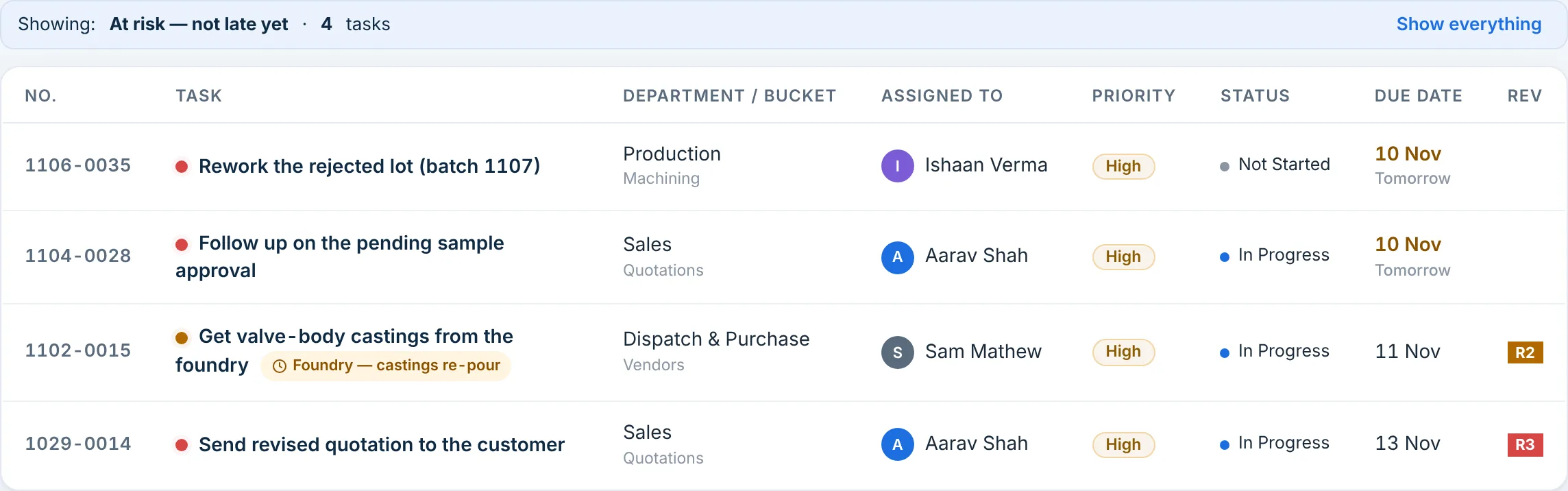
The Priority × Impact matrix shows four High-priority, Very High-impact tasks to clear first. Aarav clicks At risk and gets four tasks, each with its owner and date, the castings among them.
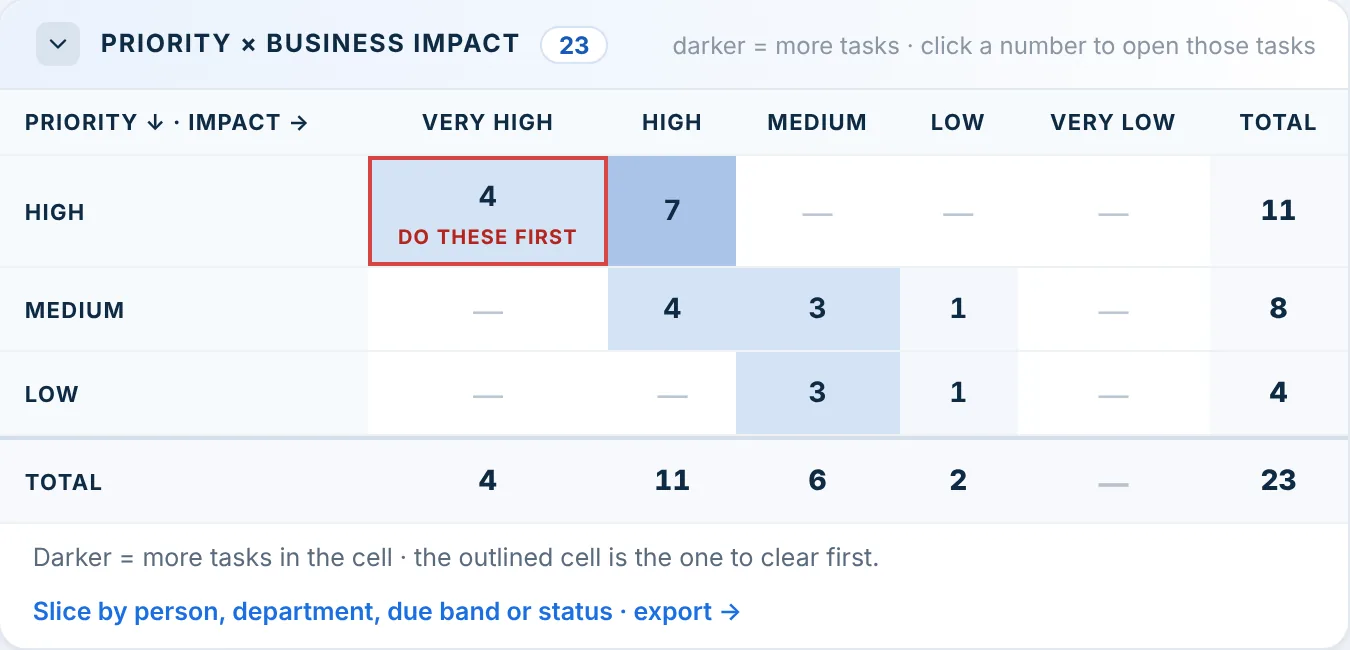
Priority × Business impact matrix for 23 open tasks: High priority and Very High impact, 4 tasks, marked Do these first; High and High 7; Medium and High 4; Medium and Medium 3; Low and Medium 3
Dashboard → Priority × Business impact, 10:05 AM
Tasks showing At risk, not late yet, 4 tasks: Rework the rejected lot, Ishaan Verma, due 10 Nov; Follow up on the pending sample approval, Aarav Shah, due 10 Nov; Get valve-body castings from the foundry, Sam Mathew, waiting for the foundry, due 11 Nov, R2; Send revised quotation to the customer, Aarav Shah, due 13 Nov, R3
At risk → its four tasks, 10:05 AM · each line opens the task

Mon 9 Nov, 10:20 AM · Decide

Each decision goes on its task, with the person who will act.

From the intervention list, three decisions: Ishaan calls the foundry’s owner about the castings, Aarav takes the fire-safety certificate himself, and the operator training gets a new date. Each one is on its task by 10:35, so nobody has to remember it next Monday.

The record of task Renew the fire-safety certificate, raised by Aarav Shah for Anika Bose, target 22 Oct, High priority, Very High impact; Aarav Shah on 9 Nov at 10:25: Review 9 Nov, Aarav calls the fire officer today for an inspection date
Fire-safety certificate, 10:25 AM · the decision on the record

Mon 9 Nov, 10:35 AM

Ishaan moves the operator training to 19 Nov. TaskMIS asks for the reason, and the record keeps it with the old date.

The record of task Train two operators on the new fixture: Date moved 28 Oct to 19 Nov by Ishaan Verma on 9 Nov, Dependency on others, fixture back from the toolroom on 18 Nov; Ishaan Verma at 10:35: Review 9 Nov, training the day after
Operator training, 10:35 AM · new date, with its reason

Try it before your next Monday review.

Free for up to 6 members. No credit card required.

Join TaskMIS Today

The difference

Same meeting. Different hour.

DateRound the tableIn TaskMIS
7 AMMonRound the tableNobody has the week’s numbers yet.In TaskMISWeekly Management Brief in every head’s inbox
10:00MonRound the table“Where are we on the castings?” Sam checks his phone.In TaskMISWall mode: 23 open, 7 overdue, the action list on screen
10:05MonRound the tableEach head reads out a status.In TaskMISAt risk opens its four tasks, each with owner and dateAt risk
10:20MonRound the tableStill collecting status.In TaskMISDecisions written on the tasks, each with an owner
11:00MonRound the tableThe hour ends. Decisions wait for next Monday.In TaskMISThe castings call made at 10:30 · the training has a new date

The tasks were the same either way. The difference is that the hour went on decisions.

What could change

Three outcomes for Beta1

Reviews start from the same numbers.

The brief and Wall mode show everyone the same overdue, waiting and at-risk counts.

FeatureMonday Weekly Management Brief · Wall mode

The meeting goes to what matters most.

At risk and the Priority × Impact matrix put urgent, high-impact work first.

FeatureAt risk · Priority × Impact matrix · Every number opens its tasks

Decisions don’t stay in the room.

Each decision is an update or a new date on its task, with the person who will act.

FeatureWho should step in · A reason for every date change

Possible outcomes in a fictional scenario, not measured customer results.

Used in this scenario

  • Management dashboard
  • Every number opens its tasks
  • Priority × Impact matrix
  • Monday Weekly Management Brief
  • Wall mode
  • Who should step in
See every feature on the Product page →

For management

Four answers before the meeting starts

  • What needs a decision today?

    Answered in: Dashboard · Action required
  • Which high-impact work should we clear first?

    Answered in: Priority × Impact matrix
  • Who should step in, and on what?

    Answered in: Need management intervention
  • Is anyone carrying too much?

    Answered in: Dashboard · Workload

Start this week

Start with next Monday’s review

  1. Put every open item from the last review into TaskMIS, each with one owner and a date.
  2. Before anyone sits down, open Wall mode on the meeting-room screen.
  3. Go through Action required first, and write each decision on its task before moving on.

Questions

Quick answers

Who gets the Weekly Management Brief?

Admins and heads of department, every Monday morning. It has the week’s numbers; the tasks themselves are one click away in TaskMIS.

Do we need a TV for Wall mode?

No. Wall mode is a full-screen page in the browser, so a laptop on a projector works too.

Does it replace the review meeting?

No. It changes what the hour is spent on: the numbers are ready, so the meeting is for decisions.

Bring clarity and accountability to your team.

Join TaskMIS Today

Free for up to 6 members. No credit card required.